

Hey Claude, let's explore some design ideas in Paper.
From an epic in Notion to design boards on the canvas. Here's a look at the voice-driven workflow I've been using lately.
01 One epic, plenty of ambiguity
Next Gig is a scheduling and dep-management tool for working musicians. Gig management was working well, so it was time to expand support to rehearsals and studio time.
I had Gemini draft the epic, then pasted it into my Notion backlog. The core request:
“Extend the Gig framework to support Rehearsals and Studio Sessions so musicians track all band events, shared costs, and prep logistics in one schedule.”
02 Breaking it down
The agent scanned the codebase against the epic and proposed four user stories: a booking-type selector (the foundation), rehearsal cost-splitting, studio deposit tracking, and differentiated schedule badges.
We refined these stories by voice using SuperWhisper. Speaking out loud, I could communicate my ideas and needs much faster than typing.
03 The decisions were the real work
To drive out ambiguity, the agent surfaced clear decisions with trade-offs and recommended paths. My job was simply to decide:
- Split rehearsal costs by band roster or manual headcount? Manual: not everyone is on the app yet, so simplicity is key.
- Private or shared rehearsals/sessions? Reuse existing optional sharing.
- Build everything now, or start small? Spec first to establish the foundation.
| Phase | Traditional Hand-Off | Voice-to-Canvas Loop |
|---|---|---|
| 1. Spec & Planning | Manually writing detailed specs + endless refinement meetings. | Draft a rough epic via Gemini, immediately sync it with codebase context. |
| 2. Alignment | Back-and-forth Slack threads, emails, or scheduling extra syncs. | Speak out loud via SuperWhisper, transferring high-density context in seconds. |
| 3. Mockups & UI | Drafting static mockups in Figma, guessing design system tokens. | Agent generates production-ready screens directly in Paper using real tokens. |
| 4. Iteration | Annotating screenshots and waiting days for redesigned assets. | Push back out loud: “This doesn’t work for X,” UI updates instantly. |
04 Into Paper: the screens take shape
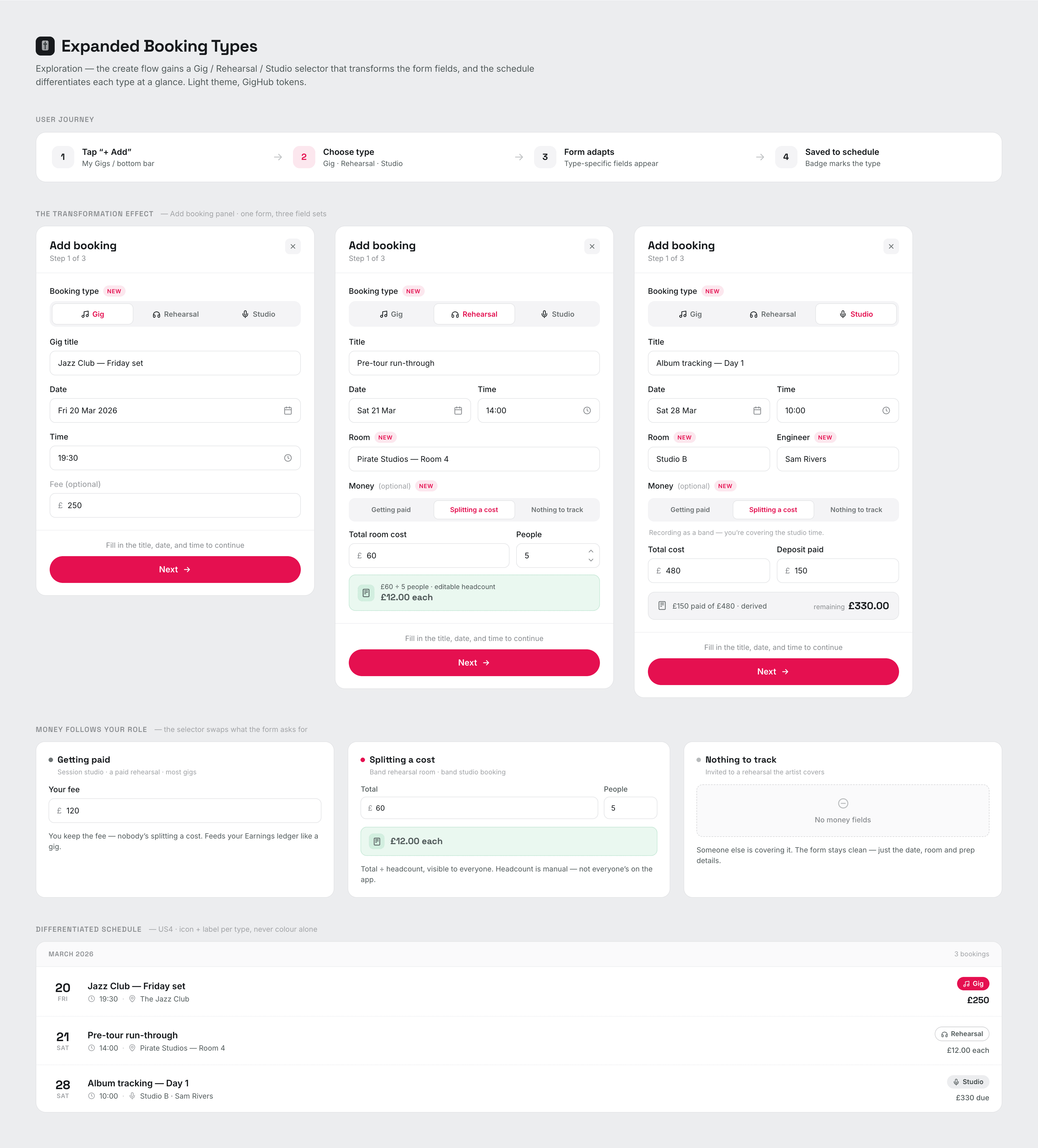
With the logic settled, I asked Claude to use my custom AI skills and start ideating in Paper. Because Claude was pre-loaded with my design system, it generated on-brand screens (a user-journey strip and the Add Booking panel in all three states side-by-side) using my real type scale, colors, and component tokens.
05 The feedback loop that mattered
Seeing the mockups, I pushed back: the cost fields assumed the user was always the one paying. In a musician's life, cash flow varies: sometimes the client covers the rehearsal, sometimes you're a session player getting paid, and sometimes you're splitting a room fee.
This feedback reshaped the data model. We added a simple Money selector (Getting paid · Splitting a cost · Nothing to track) tied to your role in the booking. The boards updated instantly to show all three states.
06 What made it work, and where it goes next
Four things that mattered:
- Epic as source of truth: every screen mapped back to a user story.
- Voice: faster than typing for dumping context and product judgment.
- Explicit trade-offs: the agent asked questions instead of guessing.
- Connected design tool: “Let's see it” took seconds, not a hand-off loop.
Interaction model locked, mockups approved. Next: write the implementation spec.
07 Checklist
Draft a rough epic with an LLM and drop it in Notion.
Point the agent at the epic and codebase; break it into small stories.
Refine by voice: have the agent surface trade-offs, then decide.
Generate screens in your design tool using real tokens.
Push back out loud against real-world edge cases.
Write the implementation spec once the boards hold up.